
JustPasteIT is a straightforward and user-friendly platform designed for quickly sharing text, code snippets, or documents online. It stands out for its simplicity, allowing users to paste, format, and share content without the need for registration or complicated processes. Whether you’re a programmer collaborating on code, a writer sharing drafts, or someone who needs to distribute information efficiently, JustPasteIT offers a fast and accessible solution.
The platform generates a unique URL for every piece of content, making it easy to share with others via email, messaging apps, or social media. Additionally, its optional privacy settings ensure you can choose whether your content is publicly viewable or restricted to specific individuals. JustPasteIT bridges the gap between speed and functionality, making it an essential tool for anyone seeking a hassle-free way to share textual content.
Guide to Using JustPasteIT
JustPasteIT is an easy-to-use platform for sharing text, code snippets, and other content. Here’s a detailed step-by-step guide on how to use it effectively:
1.Accessing the Website
Open a Web Browser: Launch any modern web browser (Chrome, Firefox, Safari, etc.).
Go to the JustPasteIT Website: Type www.justpaste.it into your browser’s address bar and press Enter.
2.Pasting Your Content
- Locate the Text Box: Upon landing on the homepage, you’ll see a large, empty text box in the center of the page.
- Paste or Type Your Content:
- To Paste: Copy the text (or code) from another source (e.g., a text file, email, or document) and paste it directly into the box.
- To Type: You can manually type any content directly into the box.
3.Formatting Your Text
Text Formatting: If you need to format the text (e.g., bold, italic, or add links), JustPasteIT offers a simple toolbar above the text box for basic styling.
You can bold or italicize text, or add hyperlinks.
Code Snippets: If you’re sharing code, JustPasteIT will automatically recognize and highlight programming syntax (e.g., JavaScript, Python) to make it easier to read.
4.Adjusting Privacy and Preferences
Privacy Settings:
Public Paste: By default, your paste will be public. Anyone with the link can view it.
Private Paste: If you want to restrict access, you can use the privacy settings to make the paste private or set a password
Expiration Settings: Some pastes may allow you to set an expiration time, meaning the paste will automatically delete after a certain number of days or once accessed.
5.Generating3 and Sharing the Link
Click on “Publish” or “Create Paste“: After you’re happy with your content and settings, click on the button to generate a unique URL for your paste.
Copy the URL: Once your paste is created, the platform will provide a unique URL. You can simply click “Copy” to copy the URL to your clipboard.
Share the Link: You can now share the URL with others via email, message, or any other medium.
6.Managing Your Paste
Editing: If you need to update or modify the paste after it’s been created, return to the URL and click on the “Edit” button (if available).
Deleting: You can delete the paste by accessing the link and selecting the delete option, or by visiting your account settings (if you created one).
7.Managing Multiple Pastes
Account Creation: If you create an account on JustPasteIT, you can manage multiple pastes under one account, giving you more control over all your shared content.
Storing Pastes: With an account, you can keep track of pastes, and access or delete them at any time.
Core Features of JustPasteIT
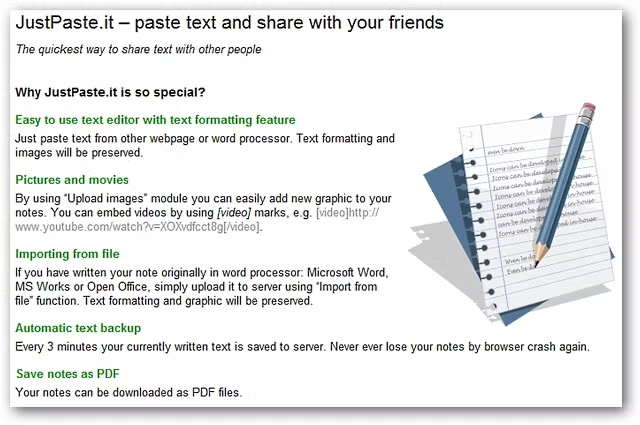
JustPasteIT offers several key features that make it a user-friendly and versatile platform for sharing text or code snippets. Below are the core features that define the platform’s functionality:
1.Intuitive User Interface
Simplicity: JustPasteIT is designed to be highly intuitive and easy to navigate. Users can immediately paste or type their content without unnecessary steps or complex menus.
Minimalist Design: The platform’s clean and straightforward interface prioritizes efficiency, ensuring that users can focus solely on sharing their text.
2.Anonymous Sharing
No Registration Required: One of the standout features of JustPasteIT is the ability to share content without needing to create an account. This anonymous aspect appeals to users who want a fast and private way to share text without leaving any personal information behind.
Instant Use: You can immediately paste your text, generate a shareable link, and distribute it without any delays or sign-up processes.
3.Customizable Visibility
Public Sharing: By default, content shared on JustPasteIT is public, meaning anyone with the link can access the pasted content. This is ideal for sharing information with a wider audience.
Private Sharing Options: JustPasteIT allows users to choose the visibility settings of their content, providing options to make pastes private or restricted to specific users. Some advanced features may even allow password protection (depending on the platform’s current features).
4.Rich Text Formatting
Basic Text Formatting: JustPasteIT supports text formatting, such as bold, italics, and underlined text, helping users emphasize important sections.
Links and Lists: Users can insert hyperlinks and create bulleted or numbered lists, making it easier to structure content or reference external sources.
5.Code Syntax Highlighting
Code-Friendly: One of the standout features for developers is the syntax highlighting capability, which makes JustPasteIT an ideal platform for sharing code snippets. It automatically detects programming languages (e.g., Python, JavaScript, HTML) and displays them with the appropriate color coding, improving readability.
Language Support: JustPasteIT supports a wide range of programming languages, ensuring that developers can share their code in a structured and easily readable format.
6.Mobile-Friendly Design
Cross-Device Compatibility: JustPasteIT is fully responsive and works seamlessly across all devices, including desktops, tablets, and smartphones. This makes it convenient for users to access the platform from any device, whether they are at work, home, or on the go.
No Download Required: Since JustPasteIT is a web-based tool, there’s no need for downloads or installations. Users can start sharing content immediately after accessing the site.
7.Easy Paste Management
Edit and Delete: After creating a paste, users can edit or remove it if necessary. This ensures that users can keep their shared content up-to-date and manage it as their needs change.
Link Generation: Each paste automatically generates a unique URL that users can easily share with others. This link is permanent unless the paste is deleted by the user, making it a reliable tool for distributing content.
8.Expiration Options
Automatic Expiry: In some cases, users can choose to have their paste automatically expire after a set period, ensuring that sensitive content does not remain accessible indefinitely. This feature enhances privacy and security for users sharing temporary information.
Guide to Using JustPasteIT
JustPasteIT is a simple yet powerful tool for sharing text or code snippets online. Whether you’re collaborating on a project or sharing a quick note, JustPasteIT streamlines the process. Here’s a step-by-step guide on how to effectively use the platform:
1.Accessing the Platform
Navigate to JustPasteIT: Open your browser and go to justpaste.it.
No account needed: One of the key advantages of JustPasteIT is that you don’t need to create an account to use the service. It’s entirely anonymous, allowing for quick, hassle-free sharing.
2.Entering Content
Pasting Text: Once you’re on the homepage, you’ll see a large text box. Simply paste or type your content into this field. You can paste plain text, code, or even HTML.
Typing Text: Alternatively, you can type directly into the box if you need to create new content on the fly.
Formatting: You can use basic formatting (bold, italics, etc.) directly in the text area if the platform supports it. For code, JustPasteIT automatically formats certain programming languages for easy readability.
3.Formatting and Editing
Text Formatting: If your content includes plain text, you can add simple formatting such as links or use markdown syntax for headers, lists, or bullet points. This helps in improving the organization and clarity of the shared information.
Code Snippets: For developers, JustPasteIT automatically recognizes programming languages such as Python, JavaScript, HTML, etc., and highlights syntax accordingly. This makes code sharing more readable and professional.
Preview: Before finalizing your paste, review the content for any errors and ensure that it’s formatted the way you want it.
4.Set Preferences
bb
Public: By default, your paste is public and can be accessed by anyone with the URL. This is ideal for sharing general information with a wider audience.
Private: You can also keep your paste private, where only people with the link can view it. JustPasteIT also provides options to make the paste password-protected (if available), enhancing privacy.
Expiration Time: Some pastes may come with an expiration feature, meaning they’ll automatically be deleted after a certain period. You can choose how long you want your paste to remain accessible, such as 1 hour, 1 day, etc.
5.Generate and Share the Link
Create the Paste: Once your content is ready and the settings are configured, click on the “Create” button or “Paste” button, depending on the platform version.
Unique URL: After creating the paste, JustPasteIT will generate a unique URL (web link) for your content. This link can now be shared with anyone you want.
Copy the URL and distribute it via email, messaging apps, or social media, depending on your sharing preferences.
Anyone with the link can view your content based on the privacy settings you selected.
6.Edit or Delete Your Paste
Edit Your Paste: If you need to make changes to the pasted content after sharing it, you can usually edit it directly via the platform (if such a feature is enabled). Some pastes allow for modifications, while others may not.
Delete Your Paste: JustPasteIT gives users the option to delete a paste at any time. Once deleted, the content is no longer accessible. This feature is particularly useful for sensitive or time-sensitive content.
Tips for Effective Use
Code Sharing: When sharing code, use appropriate indentation and syntax highlighting to make your paste more readable. JustPasteIT will automatically format the code, but clear and well-organized input improves the output.
Collaborative Work: For team projects, use JustPasteIT to quickly share drafts, documents, or meeting notes without needing to sign up for an account or configure complicated settings.
Security: If you’re sharing sensitive information, make sure to use the password protection feature and set an expiration time to ensure the information isn’t publicly accessible forever
Privacy and Security
While JustPasteIT offers a convenient way to share text or code snippets, users should be mindful of privacy and security concerns, especially when sharing sensitive or personal information. Below is an explanation of key elements regarding privacy and security on the platform:
1.Public vs. Private Pastes
JustPasteIT allows users to decide whether their pasted content is public or private. This is a crucial aspect of its privacy settings:
Public Pastes: These are visible to anyone who has the URL. They can be indexed by search engines and accessed by anyone with the link. If you’re sharing non-sensitive content, such as open-source code or publicly available documents, a public paste works well.
Private Pastes: These pastes are only accessible to individuals with the direct link. They are not indexed or visible on search engines. However, it’s important to note that, depending on JustPasteIT’s policies, even private pastes might still be stored and accessed by the platform’s administrators.
2.Password Protection
Some pasting platforms, including JustPasteIT in some cases, allow users to password-protect their pastes. This adds an additional layer of security by restricting access to the content only to individuals with the correct password. If this feature is available, it enhances confidentiality, particularly when sharing sensitive or confidential information.
3.Data Retention and Expiration
JustPasteIT offers users control over how long their pasted content stays available. Some pastes can be set to expire after a certain period, which ensures that the content doesn’t remain accessible indefinitely. This feature is especially useful for temporary information that no longer needs to be publicly available.
Expiration Settings: You can set your paste to expire after a specific period (e.g., 24 hours, 7 days). After the set time has passed, the paste is automatically deleted from the platform’s servers.
Manual Deletion: If you no longer want your paste to be accessible, you can manually delete it. This ensures that the content is permanently removed from the platform.
4.Encryption and Data Security
While JustPasteIT does not explicitly advertise end-to-end encryption for pastes, it’s important to consider the security of your data when using the platform:
No End-to-End Encryption: Without end-to-end encryption, the platform’s administrators or anyone with access to the server could potentially view your data.
HTTPS Encryption: When accessing JustPasteIT, it’s important to ensure that the website uses HTTPS. HTTPS encryption protects the data while being transmitted over the internet, preventing third parties from intercepting or altering your paste during transmission.
5.Content Management and User Control
One key feature of JustPasteIT is the ability to edit or delete pastes after they have been uploaded:
Editing: If you make a mistake or need to update the content, you can edit your paste directly through the platform.
Deleting: If you want to remove your paste permanently, you can delete it. Deleting the paste ensures it is no longer accessible, but it may still remain in the platform’s backup systems for a short time.
6.Privacy Policy and Terms of Service
Before using JustPasteIT, users should familiarize themselves with the platform’s privacy policy and terms of service. These documents outline how your data is handled, stored, and shared:
Data Collection: While JustPasteIT does not require users to create an account, it may still collect certain information such as IP addresses or metadata related to your usage.
Third-Party Access: Check whether JustPasteIT shares your data with third parties for purposes such as analytics or advertising.
7.Potential Risks
Although JustPasteIT offers useful features, there are inherent risks in using any online text-sharing platform:
Data Exposure: If pastes are shared publicly or without proper security settings, sensitive information could be exposed to unintended recipients.
Server Breaches: Like any online platform, there’s always the risk of a server breach where attackers could gain unauthorized access to stored pastes.
Search Engine Indexing: Public pastes may be indexed by search engines, potentially exposing your content to a wider audience than intended======
Practical Applications of JustPasteIT
JustPasteIT offers a range of practical applications across different fields and use cases. Its simplicity and versatility make it an ideal solution for sharing text or code snippets quickly and efficiently. Here’s a closer look at how it can be used in various scenarios:
1.For Developers
Sharing Code Snippets: JustPasteIT is an excellent platform for developers to share small code snippets or error logs. The syntax highlighting feature ensures that code is easily readable, making it suitable for collaboration with others or seeking assistance from online communities.
Debugging Assistance: Developers can paste code that needs debugging and quickly share it with colleagues or in online forums. This saves time compared to traditional file-sharing methods.
Temporary Storage for Code: Developers may use JustPasteIT to store temporary versions of their code or configurations, making it easy to access across devices or share it for collaboration.
2.For Writers
Drafts and Feedback: Writers can paste excerpts or full drafts of their work for feedback or review from peers, colleagues, or clients. The simplicity of the platform allows for quick sharing without requiring complex file formats or tools.
Creative Collaboration: Authors can collaborate on writing projects by pasting parts of their work and making edits directly through the platform.
Idea Sharing: JustPasteIT allows writers to quickly jot down and share ideas, ensuring seamless communication and brainstorming sessions.
3.Temporary Notes or Information Sharing
Quickly Share Lists or Instructions: JustPasteIT is ideal for quickly sharing checklists, notes, or instructions. For example, you could paste a list of to-dos or meeting notes and share them instantly with others.
Information Sharing in Meetings: During virtual meetings, participants can use JustPasteIT to quickly share key points, action items, or follow-up tasks in real time.
Temporary Communication: It can be used as a short-term solution for sharing sensitive information that doesn’t need to be stored long-term.
4.Collaboration in Teams
Project Collaboration: Teams working on documents, proposals, or presentations can share text-based content easily on JustPasteIT. It’s ideal for small groups collaborating on ideas, drafts, or project updates.
Feedback on Documents: JustPasteIT allows team members to share and provide feedback on documents without the need for formal collaboration platforms or file-sharing tools.
Shared Notes: Team members can quickly exchange important meeting notes or action items, helping to keep everyone aligned.
5.For Educational Purposes
Sharing Study Notes: Students and educators can paste summaries, study materials, or lecture notes on JustPasteIT and share them with classmates or peers.
Collaborative Learning: It fosters collaborative learning by enabling easy sharing of educational content, resources, or learning materials.
Code Learning and Sharing: In programming classes or coding boot camps, JustPasteIT can be used to share code examples, solve problems, and discuss technical concepts.
6.Temporary Storage of Sensitive Information
Secure Sharing with Password Protection: When sensitive information needs to be shared temporarily (e.g., a password or access code), JustPasteIT provides a method of securing it through password protection.
Quick Transfer of Private Information: Although it should be used cautiously, users can paste confidential details for short-term sharing, knowing they can delete or password-protect the paste.
7.Personal Use for Notes and Reminders
To-Do Lists: Individuals can use JustPasteIT to create and share personal to-do lists, reminders, or shopping lists. This allows quick access from any device.
Memory Joggers: Short-term memory aids like notes on upcoming appointments or quick thoughts can be pasted for easy access.
Organizing Ideas: JustPasteIT can serve as a temporary space to organize fleeting ideas or brainstorm topics for projects, articles, or personal interests.
Alternatives to JustPasteIT
While JustPasteIT is a versatile tool for quickly sharing text and code, several other platforms provide similar functionality, each with unique features tailored to different user needs. Below is a professional comparison of some prominent alternatives to JustPasteIT:
1.Pastebin
Overview: Pastebin is one of the oldest and most popular text-sharing platforms, widely used by developers for sharing code snippets, logs, and other types of text.
Key Features:
Syntax Highlighting: Supports a wide range of programming languages, making it ideal for developers.
Public and Private Options: Users can create public or private pastes, with the latter requiring a password.
Expiration Control: You can set an expiration date for your paste, from 10 minutes to permanent.
Account Required: While anonymous pasting is possible, creating an account allows for management of pastes.
Pros:
Extensive syntax highlighting for various languages.
Well-suited for developers.
Option to monetize through paid plans with additional features.
Cons:
Limited text formatting options.
The free version is supported by ads.
2.Hastebin
Overview: Hastebin is a minimalist paste-sharing tool that focuses on simplicity and ease of use. It’s designed for users who need to share text quickly without any unnecessary features.
Key Features:
No Registration Needed: Like JustPasteIT, Hastebin allows users to share text anonymously.
Real-Time Sharing: Pastes are instantly generated and available to share as soon as the text is submitted.
Syntax Highlighting: Provides basic syntax highlighting for code.
Link-Based Sharing: The paste is available via a simple URL that can be shared with anyone.
Pros:
Ultra-simple, fast interface.
No sign-up required for quick pasting.
Lightweight and easy to use.
Cons:
Lacks advanced features like privacy settings and long-term storage.
Limited formatting options.
Basic syntax highlighting compared to more comprehensive platforms like Pastebin.
3.GitHub Gists
Overview: GitHub Gists is a powerful tool built by GitHub for sharing and managing code snippets, scripts, and documentation. It’s specifically designed for developers and integrates well with GitHub’s ecosystem.
Key Features:
Version Control: Since it integrates with GitHub, Gists offers version control, making it easy to track changes to shared code.
Private and Public Gists: Gists can be either public or private. Private gists are not indexed by search engines but still accessible to anyone with the link.
Markdown Support: Users can format their text using Markdown, making it easy to create documentation or README-like files.
Collaboration Features: Gists can be forked or commented on by others, making it suitable for collaborative projects.
Pros:
Full integration with GitHub for seamless code management.
Supports version control and collaboration.
Advanced syntax highlighting for a wide range of programming languages.
Cons:
Requires a GitHub account for full functionality.
Not as simple or fast for casual users who just need quick text sharing.
4.Ghostbin
Overview: Ghostbin is a paste-sharing platform that emphasizes privacy and encryption. It is designed for users who need to share sensitive data or code securely.
Key Features:
Encryption: Ghostbin offers end-to-end encryption for all pasted content, ensuring that only those with the link can view it.
Self-Destructing Pastes: Users can set an expiration time for their pastes, after which they are automatically deleted.
Password Protection: Some pastes can be password-protected for extra security.
Support for Syntax Highlighting: Ideal for developers working with code.
Pros:
Strong focus on security and encryption.
Automatic paste deletion to ensure privacy.
Cons:
Limited to short-form pasting.
Lacks some advanced features of platforms like GitHub Gists or Pastebin.
5.Paste.ee
Overview: Paste.ee is a feature-rich alternative to JustPasteIT, allowing users to share text, code, and documents with a variety of customization options.
Key Features:
Syntax Highlighting: Supports code pasting with syntax highlighting.
Privacy Options: Users can choose between public, unlisted, or private pastes. Password protection is available for additional security.
File Uploads: In addition to text, users can upload files (e.g., PDFs or images) to share.
Custom Expiration: Pastes can be set to expire after a chosen period.
Pros:
Rich set of features for text and file sharing.
Multiple privacy and expiration settings.
Supports a wide range of media types beyond just text.
Cons:
Some features are restricted to premium plans.
User interface is more complex than minimalist alternatives like Hastebin.===========
JustPasteIT is a user-friendly platform for quickly sharing text and code. It allows users to paste content, format it, and choose visibility settings without needing to create an account. Ideal for casual users and developers, it provides a simple, anonymous way to share information. However, it lacks advanced privacy features and long-term storage, so those needing enhanced security or collaboration tools might prefer alternatives like Pastebin or GitHub Gists. Overall, JustPasteIT is best for fast, straightforward sharing.